Audio Direction HUD

Hear Direction
See the Sound

EchoVector turns footsteps, gunfire, item sounds, and other directional cues into a real-time visual HUD, helping you read direction, intensity, and distance more clearly in training and complex audio environments.

EchoVector Live Online
DirectionFront Right Peak-18.6 dB Latency20 ms

Interface Preview

Turn Audio Cues into Clear Visual Signals

EchoVector Direction HUD
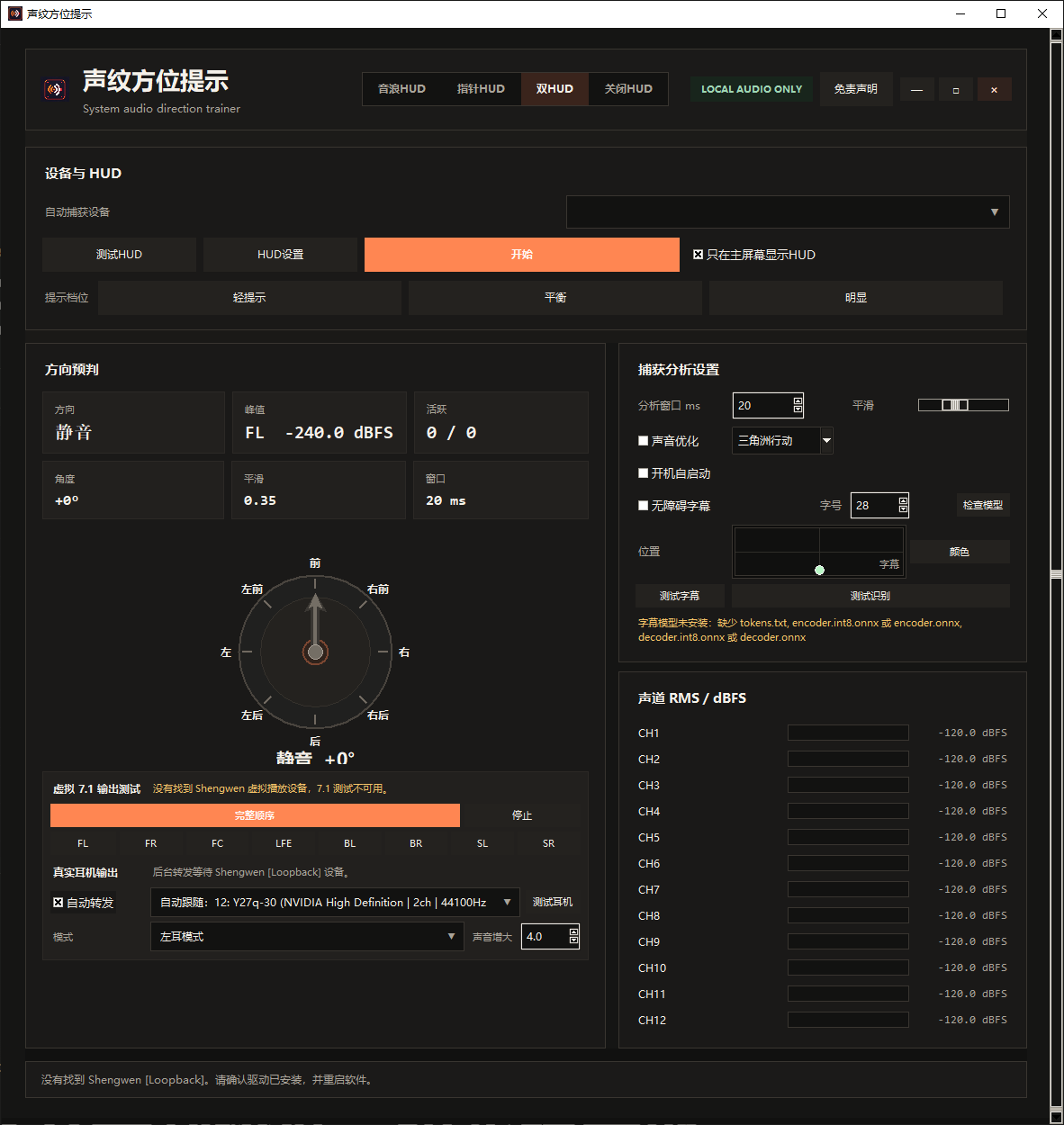
EchoVector interface showing dual HUD views, audio device selection, directional prediction, and 7.1 output testing
01

Real-Time Direction HUD

Visualize directional sounds as they happen, with clear cues for direction, intensity, and approximate distance.

02

Virtual 7.1 Audio Bridge

Connect system output to your physical headphones with the included virtual 7.1 driver and capture sound cues from eight directions.

03

Soundstage Cleanup

Reduce distracting background audio and bring important cues such as footsteps into clearer focus.

04

Live Captions and Translation

Convert speech into real-time captions and translation prompts for communication, spectating, and learning scenarios.

Video Guide

From Installation to Calibration

Install and Activate

Install the client, enter your CDK, and confirm the license status and expiration time.

Configure Virtual Audio

Set the Windows output device, select the loopback capture source, and test all 7.1 channels.

HUD Style and Multi-Monitor Setup

Adjust cue intensity, opacity, and directional sensitivity, then lock the HUD to your preferred display.

Text Guide

Read the Full Setup Guide

CDK Plans

Choose the CDK Term That Fits You

Every CDK unlocks the same features. Plans differ only by license duration. Prices are charged in US dollars (USD).

Download

Download EchoVector

Available for Windows 10 and Windows 11.

Download for Windows Download mirror hosted on Quark Cloud Drive. Access code: 1Y1H
Open a WeChat or QQ support group QR code.

Notes

What You Should Know Before Using EchoVector

What is EchoVector?

EchoVector is a visual audio-direction tool designed for people who benefit from visual sound cues, including users with hearing loss. It converts directional sounds into a HUD that presents direction, intensity, and approximate distance in real time.

End User Terms

This software is intended only for binaural soundstage awareness, directional listening practice, and auditory sensitivity training.

It visualizes system-wide audio for directional reference. It does not read game memory, modify game data, inject code, or interfere with game processes.

It is intended for everyday auditory training, accessibility support, and basic sound-direction practice. It is not a cheat or competitive advantage tool and must not be used for prohibited competitive activity.

Users accept responsibility for any account-related risk arising from how they use the software.

Software Installation and End User License Terms

1. EchoVector is a personal auditory learning and soundstage training tool. It does not crack, alter, or intrude into online game software.

2. EchoVector processes system playback audio only. It does not reverse engineer, hook, or inject into game clients.

3. Users agree to use it only for accessibility, hearing rehabilitation, soundstage training, and casual practice, not for official competitive matches or conduct that undermines fair play.

4. Users are solely responsible for consequences caused by prohibited or improper use, including sanctions imposed by third-party platforms.

5. Repackaging, resale, cracking, or unauthorized commercial modification is prohibited.